
gWebTail: tail -f in the browser for teams without SSH access
- Monitoring , Tools
- June 16, 2025
Table of Contents
A familiar scene: a new build is deployed to a test server and a developer asks “can you send me the log?”. Someone with SSH access logs in, runs tail -f, copies a chunk into a chat — and ten minutes later does it again.
Giving everyone SSH access to the server is not an option. Setting up a full logging stack — ELK, Loki with Grafana, Graylog — for a test environment or a small on-prem installation is often overkill. What people actually need is simple: open a browser, pick a log file, watch it grow.
That’s what gWebTail does.
What it is
gWebTail is a small Go application that serves a web page and streams new lines from log files to the browser over a WebSocket — essentially tail -f with a UI.
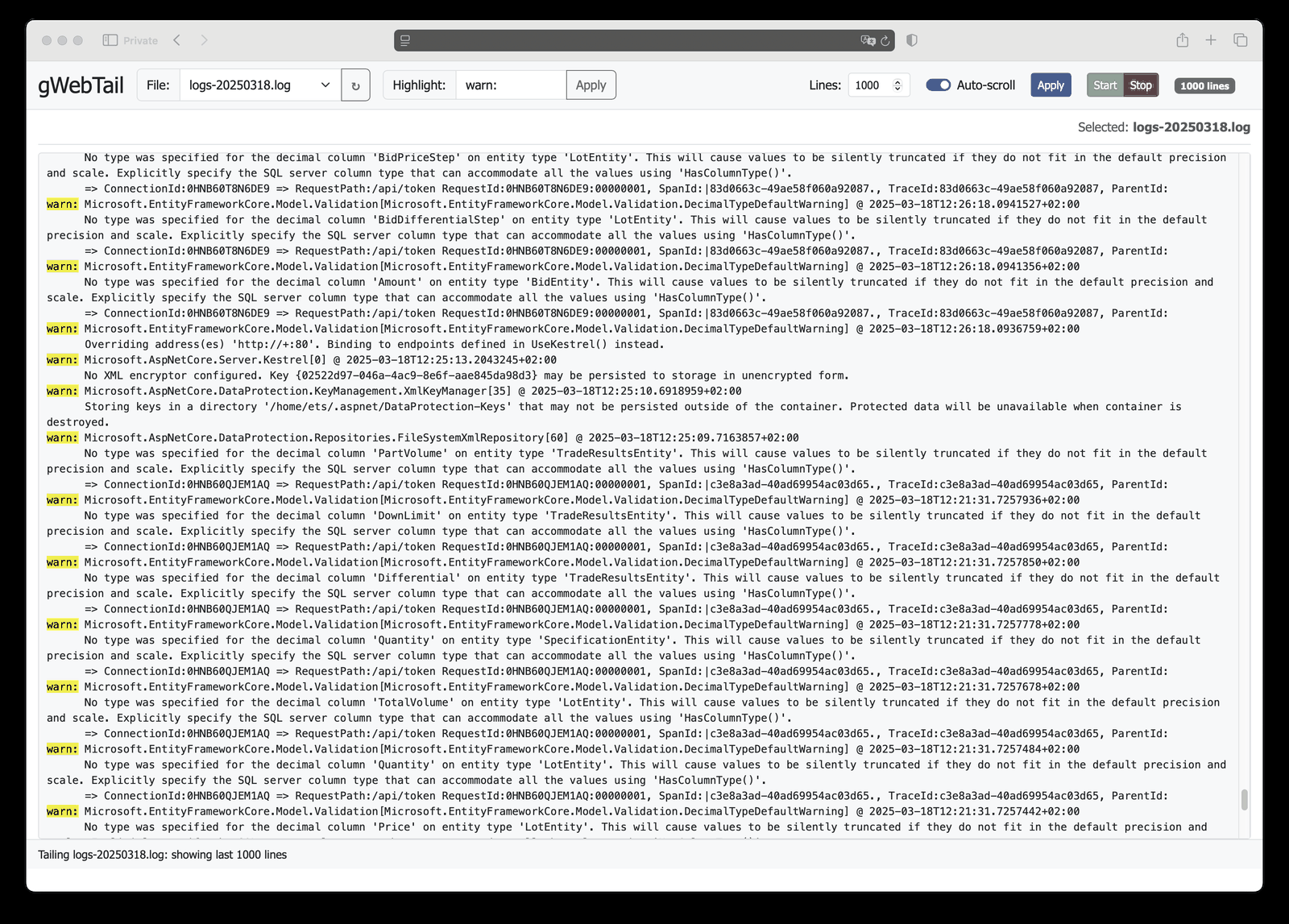
- File picker — every file in the configured log directory appears in a drop-down.
- Live tail — new lines appear as soon as they are written; the server checks files every 500 ms by default.
- Highlighting — type
warn:,ERRORor a request ID and every match is highlighted. - Line limit and auto-scroll — keep the last N lines in the browser and follow the end of the file, or turn auto-scroll off to read calmly.
- Start / Stop — pause the stream when you need to look at something.
- No external dependencies — HTML and CSS are embedded in the binary. No CDN, no internet access needed, so it works in closed on-prem networks.
It handles log truncation too: if a file is truncated (for example by logrotate with copytruncate), gWebTail notices the size drop and starts again from the new content.
Running it
The easiest way is the multi-arch Docker image (amd64 and arm64):
docker run -d --name gwebtail \
  -p 127.0.0.1:8080:8080 \
  -v /var/log/myapp:/logs:ro \
  docker.io/bsv9/gwebtail
Then open http://localhost:8080.
A few details that save time:
- Mount the log directory read-only (
:ro) — gWebTail only needs to read. - The container runs as an unprivileged user (UID 10001). Log files must be readable by it; many files under
/var/logare640 root:adm, so either adjust permissions for the application’s own log directory or point the app to write its logs somewhere readable. - Only files directly in the log directory are listed, not subdirectories. Mount the specific directory you want to show.
With Docker Compose:
services:
  gwebtail:
    image: docker.io/bsv9/gwebtail
    container_name: gwebtail
    ports:
      - "127.0.0.1:8080:8080"
    volumes:
      - /var/log/myapp:/logs:ro
    restart: unless-stopped
Or build and run the binary directly (Go 1.22+):
git clone https://github.com/bsv9/gwebtail.git
cd gwebtail
go build -o gwebtail
LOG_DIR=/var/log/myapp ./gwebtail -port 8080
Configuration
| Environment variable | Flag | Description | Default |
|---|---|---|---|
LOG_DIR |
-logdir |
Directory with log files | /logs |
| — | -port |
HTTP port | 8080 |
| — | -refreshrate |
How often files are checked for changes, ms | 500 |
| — | -buffersize |
How many bytes are read at once; also how much of the end of a file is shown when you open it | 32768 |
When you start tailing, gWebTail first sends the end of the file (up to -buffersize bytes, cut at a line boundary), then streams new content as it arrives.
Security: keep it private
gWebTail has no authentication, and log files often contain things that shouldn’t leave the team: internal hostnames, user IDs, sometimes tokens. Treat it as an internal tool:
- Don’t expose it to the internet. Bind it to localhost or an internal interface (
-p 127.0.0.1:8080:8080above), or limit access with a firewall. - Put a reverse proxy with authentication in front if more people need it — Nginx or Traefik with basic auth, or SSO via oauth2-proxy. Remember to pass WebSocket upgrade headers for the
/wsendpoint. - Run it in a container with only the log directory mounted, read-only. That way the process can’t see anything else on the host, whatever happens.
Tip
For Nginx, the WebSocket part of the config is just three lines inside the location block: proxy_http_version 1.1;, proxy_set_header Upgrade $http_upgrade; and proxy_set_header Connection "upgrade";.
When to use it — and when not
gWebTail is a good fit for:
- test and staging servers, where developers want to watch their deployment;
- small on-prem installations at customers, where you can’t install a logging stack and the network is isolated;
- giving support or QA a read-only window into one application’s logs;
- a Raspberry Pi or home server, to watch what your services are doing.
It is not a replacement for centralized logging. If you need search across weeks of history, many servers, retention policies, dashboards or alerting, use Loki, Graylog or the ELK stack — gWebTail only shows what is in the files right now.
Summary
- One small binary or Docker image, no dependencies, works offline.
- Browser-based
tail -fwith highlighting, line limit and auto-scroll. - Mount logs read-only, keep it on an internal network, and put authentication in front if more people need access.
The project is open source under the MIT license: github.com/bsv9/gwebtail.
Thinking about proper centralized logging for your infrastructure? Let’s talk.


